Picture this: you spend three weeks pitching a new client, win the account, and send over your first monthly report. It looks clean. The numbers are right. But in the footer, plain as day, it says “Powered by [SomeTool].” Your client now knows you did not build this. They know the report is automated. And that little moment of transparency costs you something that is hard to get back: the perception that your agency runs on its own systems.
White-label client reporting solves this at the root. Instead of the tool showing through, your agency brand is the only thing the client sees. Your logo. Your colors. Your name in the email subject line. The infrastructure behind it is invisible, and it should be.
This guide covers everything: what white-label reporting actually means, why it matters for retention, what to look for in a tool, and how to set it up correctly from the start.
What White-Label Client Reporting Actually Means
White-label reporting is not the same as putting your logo on a PDF you built by hand. It is not a custom PowerPoint template. It means using a reporting platform where your agency brand is applied system-wide, and the vendor is completely absent from everything the client touches.
Concretely, that means:
- Your logo appears on every report, not the platform's logo and not a generic placeholder.
- Your accent color sets the visual tone across charts, progress bars, and highlights.
- No “Powered by” footer on paid plans. The client has no reason to go looking for the tool behind the curtain.
- The client does not need an accounton the reporting platform. They access their report through a private link you share, with no login, no signup, and no exposure to the vendor's interface.
- Report emails come from your domain, not a generic noreply address that reveals a third-party sender.
The goal is simple: when a client interacts with their report, the only brand in the room is yours.
Why Your Agency's Branding Belongs on Every Report
Reporting is one of the most frequent touchpoints between an agency and a client. For most agencies running monthly reports, it is the one guaranteed moment per month where the client actively thinks about you. What you put in front of them during that moment shapes how they feel about the relationship.
A report that arrives on time, looks consistent, and carries your agency's branding signals that you have a process. It tells the client they hired a professional operation, not a freelancer with a spreadsheet. That perception is worth more than most agencies realize, especially when renewal conversations come around.
The inverse is also true. Reports that look generic, arrive inconsistently, or visibly reference a third-party tool create doubt. Clients start to wonder what exactly they are paying for. According to surveys of agency clients, feeling uninformed or underserved by reporting is consistently among the top reasons they switch providers. Better reporting does not just retain clients. It makes the case for staying before any retention conversation ever starts.
What to Look For in a White-Label Reporting Tool
Not every reporting platform that claims to be white-label actually delivers it fully. Here is the checklist to run before committing to any tool.
Logo and color customization
The basics. Your logo should appear prominently on the report, and your brand color should be used for visual elements like charts and highlights. Ideally, you set these once and they apply across every client automatically.
No vendor branding visible to the client
Check the free plan carefully. Many tools remove their branding only on paid tiers. If you are evaluating a tool, open a report as if you were the client and look for any reference to the platform name. Footer text, email headers, and browser tab titles are the common places it slips through.
Client access without a vendor account
If your client has to create an account on the reporting platform to view their data, the white-label illusion breaks immediately. Look for tools that provide private shareable links. The client clicks the link, sees the report, and never encounters a login screen tied to someone else's product.
Branded email delivery
Scheduled report emails should come from your domain. An email from reports@youragency.com looks intentional and professional. An email from noreply@reportingtool.io looks like a notification from software, not a communication from your agency.
Per-client configuration
Different clients have different needs. The tool should let you configure goals, delivery schedules, and recipient lists individually per client, without that customization affecting anyone else.
Automated delivery
White-label branding only helps if reports actually go out on time. Look for built-in scheduling so reports send automatically on the day you choose, with no manual step required from your team each month.
How to Set Up White-Label Reporting (Step by Step)
The following walkthrough uses ReportLayer, which covers all of the criteria above and has a free plan for up to three clients.
Step 1: Set up your agency branding
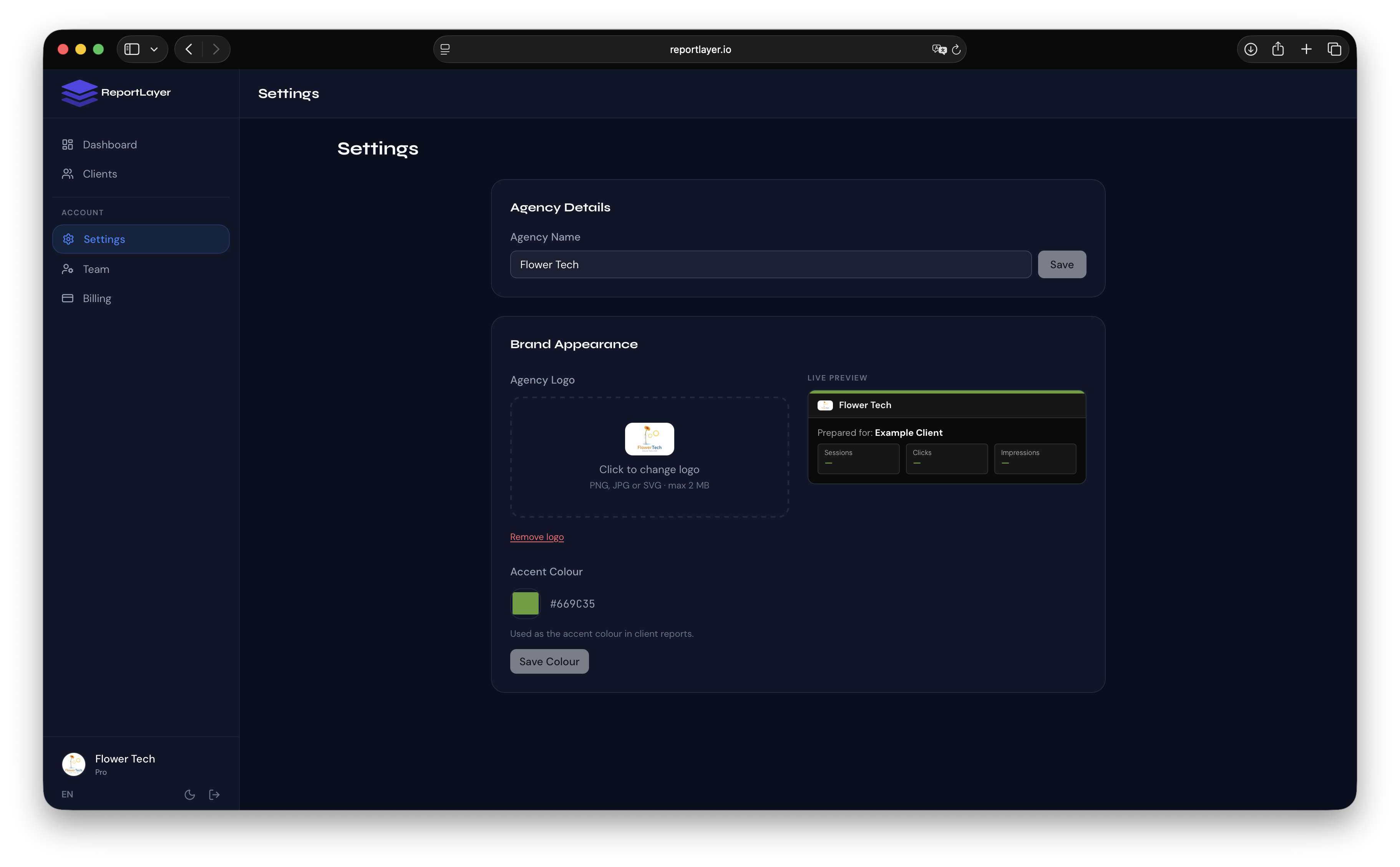
Go to Settings and upload your agency logo. Then pick your accent color using the color picker. Both settings apply automatically to every report you generate, for every client. You do this once and it propagates everywhere.
There is a live preview directly in the settings panel so you can see exactly what a client report looks like with your branding before publishing anything.
Step 2: Add your clients and connect their data
Add each client to your dashboard, then connect their Google Analytics 4, Google Search Console, and Google Ads accounts via OAuth. The client authorizes access once and data starts pulling automatically from that point forward. No CSV exports, no manual data entry.
Step 3: Configure goals per client
Inside each client's profile, set their KPI goals: for example, “1,000 sessions per month” from GA4, or “average position under 15” from Search Console. These appear on the report as progress bars with period-over-period comparisons, so the client immediately sees whether they are trending in the right direction.
Step 4: Set up automated email delivery
In the client settings, find the Email Reportssection. Enable delivery, choose weekly or monthly, pick the day, and add the client's email addresses. Report emails go out automatically on schedule with your agency branding in the header.
Step 5: Share the live report link
Every client gets a permanent private URL that shows their live report data. Share this link however works best: Slack, email, a client portal, wherever. No login required on their end. They click the link and see a fully branded report, updated within the last 24 hours.
Mistakes Agencies Make With White-Label Reporting
Skipping the branding setup because it feels optional
Most reporting tools prompt you to upload a logo during onboarding and make it easy to skip. Many agencies skip it. Six months later, every client report has a generic look and the agency wonders why clients do not seem to value the reporting work. Set branding up on day one, before any client report goes out.
Not testing what the client actually sees
Before sharing a report link with a client, open it in an incognito window. Look at it with fresh eyes. Check for vendor references, generic color schemes, or anything that looks off-brand. It takes two minutes and prevents sending something that undercuts the impression you are trying to make.
Using different branding for different clients
Some agencies customize colors or logos per client, thinking it adds a personal touch. In practice, it creates inconsistency and confusion. Your agency has one brand. Apply it consistently across every client. The personalization happens through KPI goals and report content, not through varying your own logo.
Treating white-label as a paid-only concern
Basic branding should be configured from the first client you onboard, regardless of your plan. Even on a free plan, your logo and colors should be set. The “Powered by” removal might require an upgrade, but looking professional should not.
Relying on manual delivery even after automating the data
Some agencies connect all their data sources correctly but still send reports manually each month. This creates the same consistency problems as before. If a team member is sick or busy, the report goes out late. Automate the delivery. It removes the human dependency entirely.
“Your client should not be able to tell which software runs your reporting. They should only be able to tell that your agency is on top of their account.”
Frequently Asked Questions
Does white-label reporting require a paid plan?
Partial branding, including your logo and accent color, is available on the free plan. The “Powered by ReportLayer” footer is removed on paid plans. If full white-label is a requirement from day one, the Starter plan at €29/month covers it for up to 10 clients.
Will clients ever see ReportLayer branding?
On paid plans, no. The report page, email delivery, and shareable link all carry your agency branding. There is no ReportLayer logo, footer, or reference visible to anyone accessing the report from the client side.
Can I use my own domain for report links?
Custom domains for report links are not supported yet. Report links currently use the reportlayer.io domain. The report itself shows your agency branding, but the URL in the browser bar will reference ReportLayer. Custom domain support is on the roadmap.
How do I update branding across all clients at once?
Go to Settings and update your logo or accent color. The change applies to every client report immediately. You do not need to update reports individually.
What happens to existing report links if I change my logo?
Existing links continue to work and will show your new logo automatically. The report data and URL stay the same. Only the visual branding updates.
FREE GUIDE
5 Reporting Mistakes That Are Costing Your Agency Clients
The reporting errors that drive client churn, and how to fix them before your next monthly report.