Agency reporting has been stuck in PDF format for a decade. The workflow is familiar: pull data from GA4, paste it into a slide deck or a document, add some charts, export to PDF, attach it to an email, and send. The client receives a static file showing data that was already days old when it was exported. They open it once, maybe twice, then it sits in a folder they never revisit.
There is a better format, and agencies that have made the switch are not going back. Live, shareable report links give clients access to current data whenever they want it, not a snapshot of how things looked on the day someone remembered to export.
This is not an argument against structure or against monthly summaries. Those still matter. It is an argument against the static file format specifically, and for why a live report serves both the client and the agency better in almost every scenario.
What PDF Reports Actually Cost You
The obvious cost of PDF reporting is time. Pulling data from multiple sources, formatting it consistently, exporting files, and sending them to each client adds up. For an agency with 15 clients, that process can consume an entire day each month. That is time not spent on client work.
The less obvious cost is quality. A PDF report is outdated the moment it is created. If a client opens it two weeks after you sent it, they are looking at data that is now three weeks old. If they want to check how things are going mid-month, they have nothing to look at. They have to ask, which means you have to spend time manually pulling a one-off update.
There is also a format problem. PDFs do not resize well on mobile screens. Charts that look clean on a desktop become illegible on a phone. Most clients check email on their phones. Sending a report in a format that is difficult to read on the device where it will most likely be opened is not ideal.
What Live Reports Do Differently
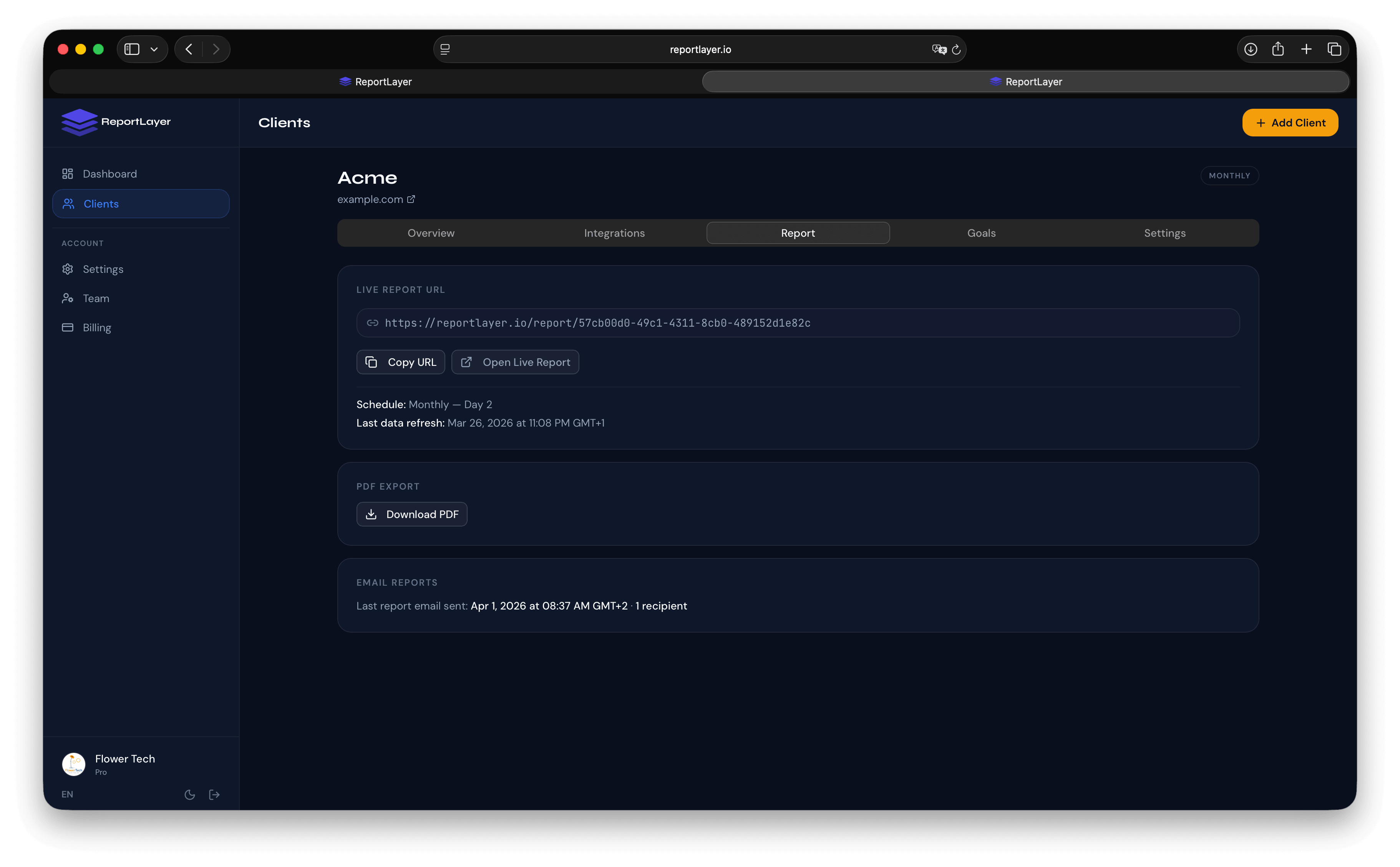
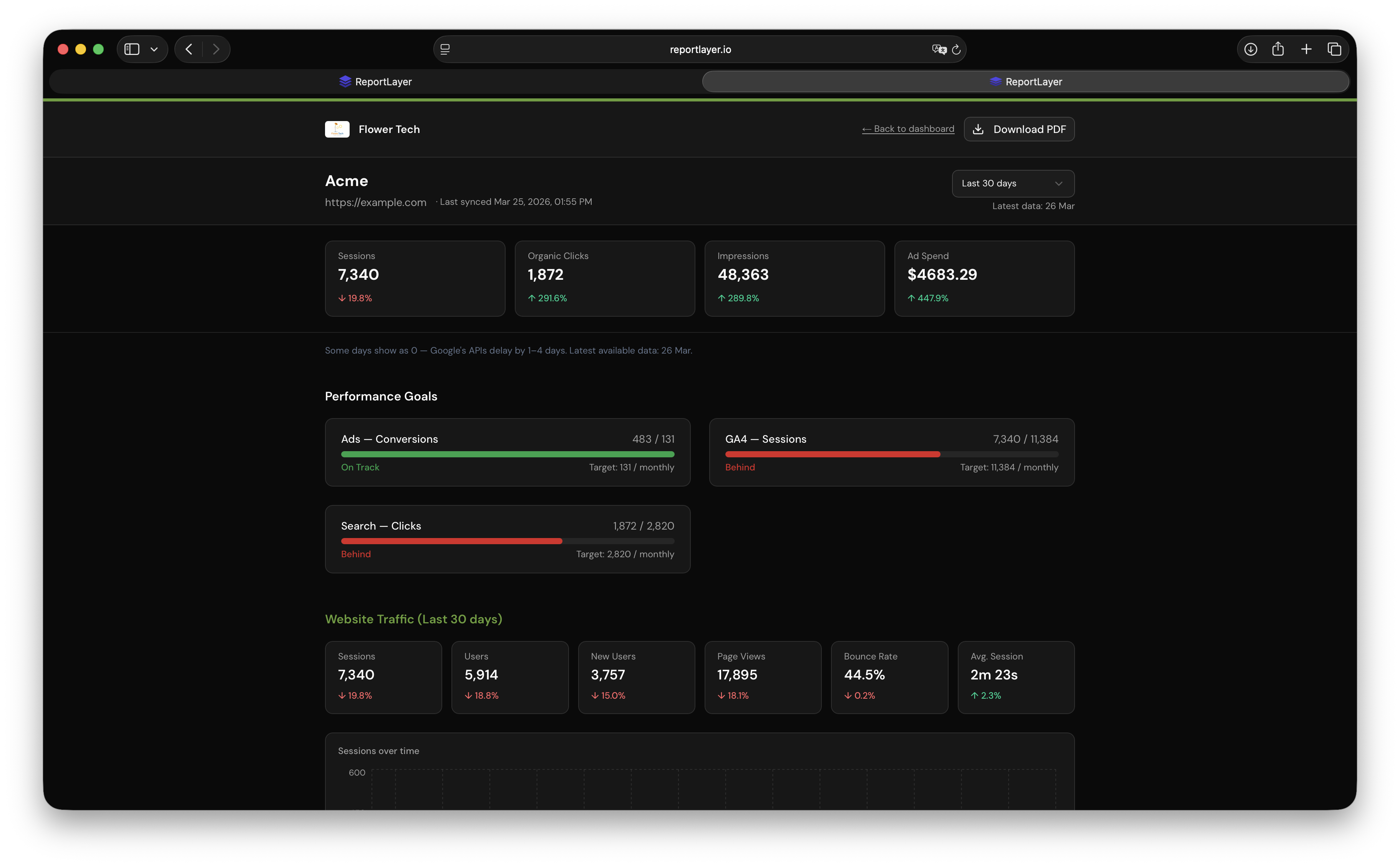
A live report is a web page, not a file. The client gets a private URL that shows their data, updated automatically. When they open it, they see current numbers, not a frozen snapshot.
Always current
Data refreshes automatically, typically every 24 hours. When a client clicks their report link on the 15th of the month, they see 15 days of data for the current period, not whatever was in the PDF you sent them on the 1st. The report is always showing the most recent picture, not the most recent export.
No file management required
The client bookmarks a link. There is nothing to download, nothing to store, and no hunting through email for last month's attachment. The link works every month. Clicking it always shows current data.
Accessible on any device
A well-designed live report is responsive. It reads cleanly on a phone, a tablet, or a desktop. Charts scale to the screen size. Text is readable without zooming in on a PDF rendered for A4 paper.
Shareable internally
Clients often need to share performance data with their own internal stakeholders: their boss, their board, their marketing team. Sharing a PDF requires attaching it to another email. Sharing a live report link takes one click. For clients who present performance data regularly, this is a small but meaningful quality-of-life improvement.
Why Live Reports Improve Retention
Client retention improves when clients feel informed. A client who can check their report anytime they want, without asking, feels more in control of their own data. That feeling of transparency is one of the strongest predictors of whether a client stays.
There is also a practical effect: clients who check their report regularly do not build up questions between monthly calls. They see the numbers moving, they see trends developing, and by the time you have your monthly review, they are working from the same current data you are. The conversation is more productive because both sides are already aligned on what happened. This is one of the most reliable reporting changes for reducing client churn. We cover the full picture in how better reporting reduces client churn.
Compare this to the PDF experience: client opens a static report, sees some numbers they have not thought about since last month, generates a list of questions, waits until the next call to ask them. Half the call is spent on context-setting rather than forward-looking discussion.
Common Objections and Why They Do Not Hold Up
"My clients are not technical enough for a live report"
Live reports that are designed well do not require any technical skill. The client clicks a link. They see a page with their data. There is nothing to configure, nothing to log in to, and nothing to interpret beyond what you would put in a PDF. If the report is well-designed, a non-technical client can navigate it faster than they can find the right PDF attachment in their email.
"I need to add commentary and analysis, which PDF supports better"
Good live reporting platforms include a notes or commentary section. Your monthly narrative belongs alongside the data, not in a separate document. If the platform you are using does not support agency commentary, that is a platform problem, not a reason to stay with PDFs.
"Clients expect a PDF"
Clients expect to receive a report. They have no inherent attachment to the file format. When you switch to a live link and it is clearly better, because it is always current, looks professional, and works on their phone, clients adapt immediately. We are not aware of agencies that switched to live reports and had clients ask to go back to PDFs.
"I want a record I can archive"
Live reports do not prevent archiving. Most platforms let you export a snapshot at any point if you need a point-in-time record for a specific purpose. But the primary reporting artifact for clients should be the live link, not the export.
Making the Switch
The transition from PDF to live reports is easier than it sounds. The process is: connect your data sources, configure the report layout and KPI goals for each client, and share the private link. Most agencies can migrate their entire client base in a day or two.
The communication to clients does not need to be complicated. Something like: “We have moved to a live reporting format. Instead of a monthly PDF, your report is now available at this link anytime. It updates automatically. You will still receive a monthly summary email, but the link is always current.” That is usually enough.
Tools like ReportLayer generate live, branded client report links automatically. Each client gets their own private URL that refreshes daily. You share the link once, and it works every month without any manual work on your end. The report carries your agency branding throughout, so clients see your logo and colors, not the tool behind it.
See what a live client report looks like before setting one up for your own clients.
Frequently Asked Questions
Do clients need to create an account to view a live report?
Not with a well-designed tool. The client receives a private link that opens directly to their report. No signup, no login, no exposure to the reporting platform. They click, they see their data.
Can I still send a monthly email alongside the live report?
Yes, and most agencies do. The monthly email includes the live report link, a short summary of what happened, and any highlights for the upcoming period. The email triggers the client to check the report. The report delivers the data. Both serve a purpose.
What happens to the report link when data is updated?
The link stays the same. Only the data changes. When a client bookmarks the link, they can return to it at any time and see the most recent data. There is nothing to update or re-share after the initial setup.
Is a live report less secure than a PDF?
Both have security considerations. A PDF can be forwarded to anyone and is not revocable. A live report link can also be shared, but access can be revoked if needed. The risk profile is similar. The more relevant consideration is whether the report contains genuinely sensitive business data, and in most agency reporting contexts, the metrics shown are not sensitive enough to require strict access controls.
How do I handle clients who specifically request a PDF?
Export a snapshot from the live report and send it as a one-off. But treat the live link as the primary reporting artifact and the PDF as a secondary export for specific requests. Most clients who initially ask for a PDF stop asking after a few months of having a live link that is clearly easier to use.
FREE GUIDE
5 Reporting Mistakes That Are Costing Your Agency Clients
The reporting errors that drive client churn, and how to fix them before your next monthly report.